
TV & Streaming Problems in UK Homes: Causes, Fixes & Budget Solutions (2026)
Struggling with buffering, weak WiFi near your TV, or Netflix refusing to load?
You’re not alone. TV and streaming problems are some of the most common tech issues in UK homes — especially in terraced houses, older properties, and flats with thick walls.
In this guide, we’ll break down:
- The most common TV & streaming problems
- Why they happen in UK homes
- Simple fixes that actually work
- When you need a budget upgrade

Common Issues – TV & streaming problems in UK homes
TV Buffering on WiFi (UK Homes)
Buffering is the #1 complaint.
Why it happens
- Router too far from TV
- Thick brick walls (very common in UK homes)
- Too many devices connected
- Cheap ISP routers (BT, Sky, Virgin)
Real example
You’re watching Netflix at 8pm. Everyone in the house is online.
Your TV drops to 480p quality or pauses completely.
Quick Fixes
- Move router to a central location
- Switch from 2.4GHz to 5GHz band
- Restart router (yes, it still works)
- Reduce connected devices during peak hours
👉 For a full breakdown, see: TV buffering on WiFi (UK fixes that actually work)
If buffering happens across the whole house, read:
👉 WiFi Problems in UK Homes
Smart TV Not Connecting to WiFi
This is very common with budget TVs.
Causes
- Wrong WiFi password
- Router band compatibility (2.4GHz vs 5GHz)
- TV firmware outdated
- ISP router glitch
Step-by-step fix
- Restart TV and router
- Forget WiFi network on TV
- Reconnect manually
- Update TV software
- Try 2.4GHz network if 5GHz fails
If it still fails, your router might be weak.
👉 See : Best Budget WiFi Routers in the UK post.
Netflix Keeps Buffering on Smart TV
Important: This isn’t always your internet.
Possible reasons
- Netflix server issue
- TV app glitch
- ISP traffic throttling
- Weak WiFi signal near TV
Quick checks
- Test Netflix on your phone
- Try Ethernet cable directly to router
- Lower streaming quality in Netflix settings
👉 You can check Netflix service status here.
Weak WiFi Signal Near the TV (Upstairs or Other Room)
Very common in:
- 2-storey UK houses
- Terraced properties
- Flats with thick concrete floors
Solutions
- WiFi extender
- Mesh system
- Router repositioning
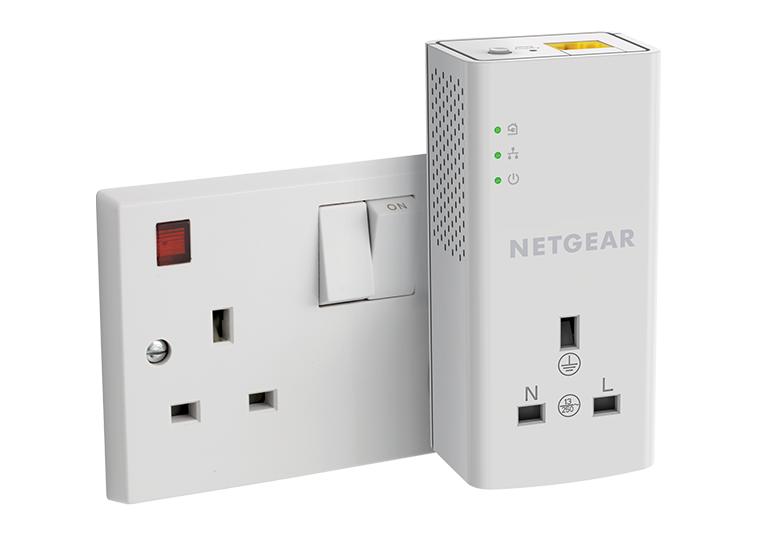
- Powerline adapters
👉 See our post Best WiFi Extenders for Thick Walls (UK)
HDMI ARC Not Working
This affects soundbars mostly.
Signs
- No sound
- Sound cuts out
- Volume control not working
Fix
- Enable HDMI-CEC in TV settings
- Use high-speed HDMI cable
- Update TV firmware
- Try different HDMI port
👉 HDMI Licensing Administrator (for HDMI specs explanation)
Soundbar Not Connecting to TV
Common causes:
- Bluetooth interference
- Wrong input source
- ARC disabled
Quick solution checklist
- Reset soundbar
- Pair again via Bluetooth
- Switch to HDMI instead of Bluetooth
If Bluetooth keeps disconnecting:
👉 See OurBluetooth keeps disconnecting post.
When You Actually Need to Upgrade
Sometimes the problem isn’t settings — it’s hardware.
You may need:
- A better router
- A WiFi extender
- A mesh system
- A newer budget smart TV
👉 Best Budget Smart TVs in the UK
🏠 Why UK Homes Have More Streaming Issues
- Brick walls block signal
- Router placed near front door
- ISP-provided routers are weak
- Smaller rooms but thicker walls
This is why budget upgrades often solve the problem.
🧠 Quick Troubleshooting Summary
Before buying anything:
- Restart router
- Move router higher
- Switch WiFi band
- Test Ethernet
- Update firmware
Only upgrade if the issue continues.
❓ Frequently Asked Questions About TV & Streaming Problems in UK Homes
Why do I have TV & streaming problems in UK homes even with fast broadband?
Even if you have fast broadband, TV & streaming problems in UK homes often happen because of weak WiFi signals, thick brick walls, router placement, or network congestion during peak hours. Many UK properties block WiFi signals more than modern plasterboard homes. Moving your router, switching WiFi bands, or using a WiFi extender can usually fix the issue.
Why does my TV keep buffering on WiFi in the evening?
Buffering in the evening is usually caused by:
- Network congestion (everyone online at once)
- ISP peak-time slowdowns
- Weak signal near the TV
Try restarting your router, lowering streaming quality, or connecting via Ethernet cable to test if it’s a WiFi issue.

Should I use 2.4GHz or 5GHz for streaming on my smart TV?
- 5GHz = faster speeds but shorter range
- 2.4GHz = slower but better through walls
In many UK homes with thick walls, 2.4GHz works better for TVs located upstairs or far from the router.
Is a WiFi extender worth it for streaming problems?
Yes — if the issue is signal strength.
A budget WiFi extender can significantly improve streaming quality in bedrooms, upstairs rooms, or back extensions.
However, if your whole house has weak internet, upgrading the router may be a better solution.
Why won’t my smart TV connect to WiFi?
Common reasons include:
- Incorrect password
- Router firmware issues
- TV software outdated
- Router band compatibility issues
Restart both devices first. If it still fails, try connecting to the 2.4GHz network.
Does Netflix buffering mean my internet is slow?
Not always. Netflix buffering can happen due to:
- Netflix server issues
- App glitches
- Temporary ISP throttling
- Weak WiFi near the TV
Test Netflix on another device to confirm whether the problem is your TV or your connection.
When should I upgrade my router for streaming?
Consider upgrading if:
- You use the ISP-provided router (BT, Sky, Virgin)
- Streaming drops in multiple rooms
- You have more than 8–10 connected devices
- Speed tests show good speeds near router but poor speeds near TV
A better router often fixes ongoing TV & streaming problems in UK homes.
Can Ethernet cable fix streaming problems?
Yes. Connecting your TV directly to the router using an Ethernet cable bypasses WiFi completely. If buffering stops, the issue is definitely WiFi-related.
Final Thoughts
TV & streaming problems in UK homes are usually caused by weak WiFi signals, router limitations, or network congestion — not necessarily slow broadband.
In many UK properties, thick brick walls and multi-floor layouts make streaming more challenging than people expect.
Start with simple fixes:
- Restart your router
- Reposition it centrally
- Switch WiFi bands
- Test with an Ethernet cable
If problems continue, a budget router upgrade, WiFi extender, or mesh system can dramatically improve performance.
The key is identifying whether the issue is signal strength, hardware limitations, or device setup — then choosing the right solution instead of guessing.
With the right setup, streaming should be smooth, stable, and stress-free — exactly how home entertainment should be.
Enjoyed our TV & Streaming Problems guides? Share your experience on Trustpilot — we’d love to hear from you!
Pingback: 7 Best Budget Smart TVs UK – Affordable Smart TVs Worth Buying
Pingback: TV Buffering on WiFi UK: 6 Proven Fixes That Actually Work
Pingback: Netflix Keeps Buffering on Smart TV UK? 9 Proven Fixes
Pingback: WiFi Signal Weak Near TV UK – 6 Easy Fixes for Dead Zones
Pingback: HDMI ARC Not Working on Smart TV UK: 3 Proven fixes
Pingback: Soundbar Not Connecting to TV : 7 Proven Fixes
Pingback: Fire Stick vs Chromecast vs Roku UK – 2026 Ultimate Guide