
WiFi Signal Weak Near TV or Upstairs (UK Home Fixes)
If your WiFi signal weak near TV UK, especially upstairs or in the back living room, you’re not alone. This is one of the most common broadband issues across UK households.
It usually sounds like this:
- Netflix buffers upstairs.
- BBC iPlayer freezes mid-show.
- The Smart TV disconnects randomly.
- Your phone works fine… but the TV struggles.
The frustrating part? Your broadband package might be perfectly fine.
In most UK homes, weak WiFi isn’t about speed — it’s about signal strength, router placement, interference, and house layout.
If you’re dealing with multiple streaming issues, start with our main guide:
👉 [TV & Streaming Problems in UK Homes: Causes, Fixes & Budget Solutions]
Let’s break down why this happens — and how to fix it properly.
Advanced Fixes for Weak WiFi Signal Near TV or Upstairs (UK Homes)
If you’ve already tried moving your router or rebooting everything and your WiFi signal is still weak near your TV or upstairs, don’t worry. Many UK homes — especially older brick properties, terraces, and semi-detached houses — are not designed for strong wireless signal distribution.
In this extended section, we’ll look at advanced home fixes, structural issues, network optimisation, and professional-grade solutions.
Why Is WiFi Signal Weak Near TV UK?
Thick Brick Walls and Ceilings
UK properties — especially Victorian, 1930s semis, and older terraces — often have solid brick internal walls.
WiFi signals weaken significantly when passing through:
- Brick
- Concrete
- Floor joists
- Insulated ceilings
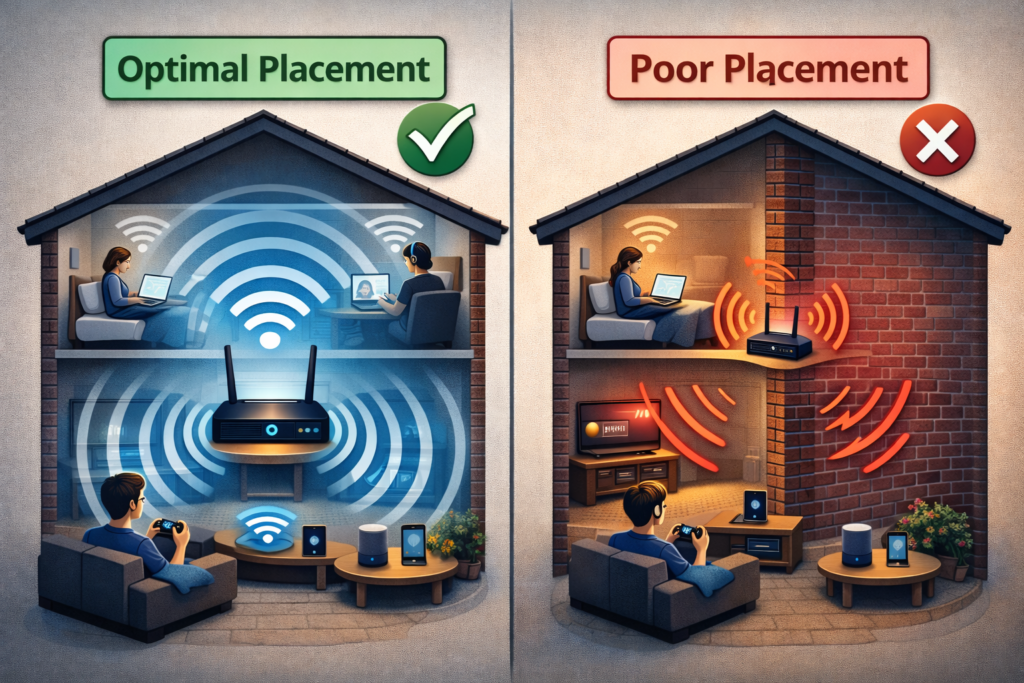
If your router is downstairs in the hallway and your TV is upstairs or at the back of the house, the signal must travel through multiple dense barriers.
That’s where most weak WiFi problems begin.
Poor Router Placement
Typical UK setup:
- Router near front door (where broadband enters)
- TV in rear living room
- Signal travels across entire house
This setup almost guarantees weak WiFi near TV upstairs.
If your router is:
- Inside a cupboard
- Behind the TV
- On the floor
- Next to metal objects
You are reducing signal strength significantly.
For deeper placement advice, see:
👉 [Why Is My WiFi So Slow in the UK? Complete Home Fix Guide]
2.4GHz vs 5GHz Confusion
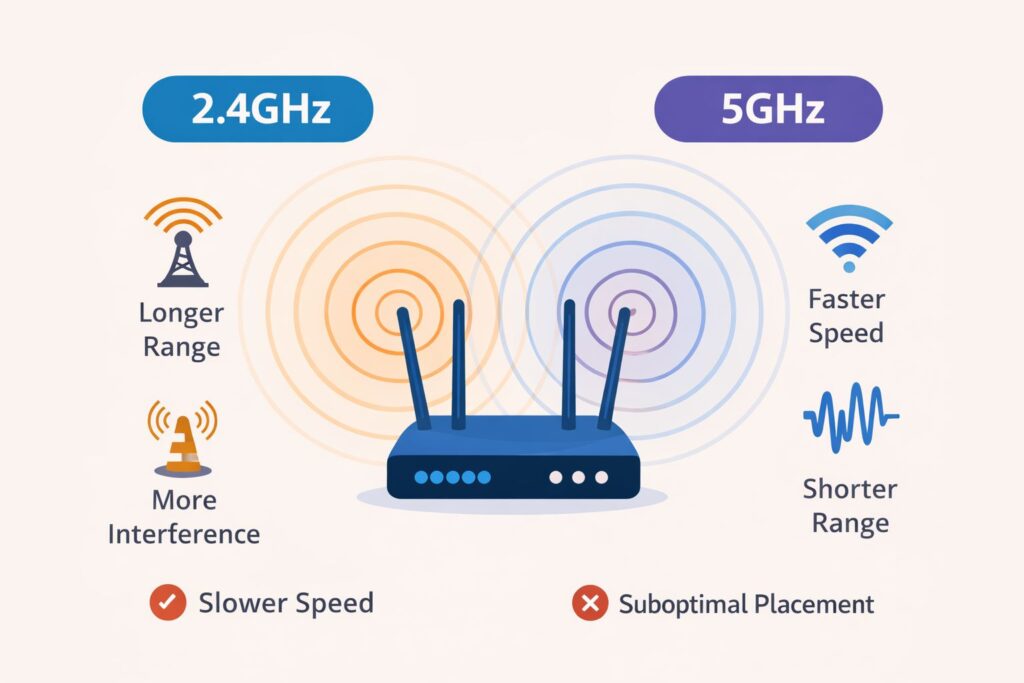
Most UK routers from BT Group, Sky Group, and Virgin Media broadcast two frequencies:
- 2.4GHz → Longer range, slower
- 5GHz → Faster, shorter range
If your TV connects to 5GHz but sits far from the router, the signal will drop frequently.
Many people accidentally connect to the faster band without realising it has weaker coverage upstairs.
Too Many Connected Devices
Modern UK households often have:
- Smart TVs
- Phones
- Tablets
- Laptops
- Xbox / PlayStation
- Smart speakers
- CCTV cameras
Older ISP routers struggle when more than 15–20 devices are connected. If you’re also noticing buffering, read:
👉 [TV Buffering on WiFi UK – Fixes That Actually Work]
WiFi Channel Interference (Terraced Houses Problem)
If you live in a terraced or semi-detached house, your neighbour’s WiFi may overlap with yours.
On 2.4GHz especially, channels get crowded — causing weak or unstable connections upstairs.
You can test interference using tools like:
👉 https://www.speedtest.net/ (to check speed drops)
👉 https://www.ofcom.org.uk/home-phones-and-broadband (broadband guidance)
Fixes for WiFi signal weak near TV UK
Move Your Router (Biggest Impact Fix)
Place your router:
✔ Centrally in the house
✔ Elevated (waist height or higher)
✔ Away from metal objects
✔ Not inside cupboards
Even moving it 1–2 metres can significantly improve upstairs coverage.
Switch Frequency Band
If your TV is far from router:
- Connect it to 2.4GHz for better range
- Use 5GHz only if TV is close
This simple change often fixes weak signal issues instantly.
Install a WiFi Extender or Mesh System
For two-storey UK homes, mesh systems work far better than basic extenders.
Mesh benefits:
- Seamless coverage
- Same network name
- Strong signal upstairs
You may find these helpful:
👉 [Best Budget WiFi Extenders UK]
👉 [Best Budget WiFi Routers UK]
Use Ethernet for Main TV
If possible, run an Ethernet cable directly to your TV.
Benefits:
- Stable 4K streaming
- No signal interference
- No buffering during peak hours
If your TV disconnects entirely, see:
👉 [Smart TV Not Connecting to WiFi UK – Complete Troubleshooting Guide]
Change WiFi Channel (Advanced Fix)
In terraced homes, manually changing WiFi channel reduces interference.
Log into your router:
Usually:
192.168.0.1
or
192.168.1.1
Set 2.4GHz channel to:
- 1
- 6
- 11
Avoid “Auto” if neighbours overlap heavily.
Restart Router Regularly
UK routers often run for months without rebooting.
Restart every 2–3 weeks to:
- Clear memory
- Refresh IP assignment
- Improve stability
Recommended Router Settings for UK Homes
To prevent weak WiFi near TV:
✔ Enable automatic firmware updates
✔ Separate 2.4GHz and 5GHz bands
✔ Disable unused guest networks
✔ Reboot router every 2–3 weeks
✔ Update router firmware regularly
If multiple streaming devices struggle, revisit our main guide:
👉 [TV & Streaming Problems in UK Homes: Causes, Fixes & Budget Solutions]
Real UK Example – WiFi signal weak near TV UK
A family in Birmingham had:
- Router downstairs hallway
- Smart TV upstairs bedroom
- Constant buffering
Solution:
- Moved router centrally
- Added mesh node upstairs
Signal improved immediately. No need to upgrade broadband package.
This is important:
Upgrading from 50 Mbps to 150 Mbps won’t fix weak signal inside the house.
When Weak Signal is NOT the Problem
If your WiFi signal weak near TV UK, Sometimes it’s not WiFi signal but:
- TV firmware outdated
- Streaming app corrupted
- ISP throttling
- Background downloads
Check for TV updates in:
Settings > Support > Software Update
Also try:
- Reinstall Netflix
- Clear cache
- Factory reset network settings
When to Upgrade Broadband
If your speed test shows:
- Below 10 Mbps → HD streaming struggles
- Below 25 Mbps → 4K streaming unreliable
Test here:
👉 https://www.speedtest.net/
But remember:
Upgrading broadband does NOT fix weak signal inside your house. Signal coverage and speed are different things.
Best Long-Term Solution: Mesh WiFi Systems
If your home is large or has thick walls, a Mesh WiFi system is the most reliable solution.
Mesh systems:
- Use multiple nodes
- Create seamless coverage
- Eliminate dead zones
- Work perfectly for upstairs TVs
Popular UK options:
- TP-Link Deco
- Google Nest WiFi
- BT Whole Home WiFi
This is especially useful if:
- Multiple people stream
- You work from home
- You use IPTV or 4K streaming
If you’re choosing a new TV setup, also see:
👉 Best Budget Smart TVs in UK – Buying Guide
FAQs – WiFi Signal Weak Near TV UK
Why is WiFi weak upstairs but strong downstairs?
Because WiFi signals weaken when passing through ceilings and brick walls.
Will a WiFi extender fix weak signal near TV?
Yes, but mesh systems perform better in two-storey UK homes.
Is Ethernet better than WiFi?
For Smart TVs, yes — it’s more stable.
Should I upgrade broadband speed?
Only if your actual speed is too low. Weak signal is usually placement-related.
Does weather affect WiFi?
Heavy storms can affect external lines, but indoor weak signal is usually layout-related.
How often should I restart my router?
Every 2–3 weeks helps maintain stability.
Final Thoughts
If your WiFi signal weak near TV UK, don’t immediately blame your broadband provider.
In most cases, the real cause is:
- Router placement
- Thick UK walls
- Frequency band choice
- Device congestion
- Neighbour interference
Start with simple fixes:
Move router → Switch band → Add mesh → Try Ethernet.
Most UK homes solve this without changing broadband packages.
And if you’re experiencing broader streaming issues across devices, revisit:
👉 [TV & Streaming Problems in UK Homes: Causes, Fixes & Budget Solutions]
Enjoyed our TV & Streaming Problems guides? Share your experience on Trustpilot — we’d love to hear from you!